
AI UGC Ads Playbook: From Product Photo to Paid-Social Clips
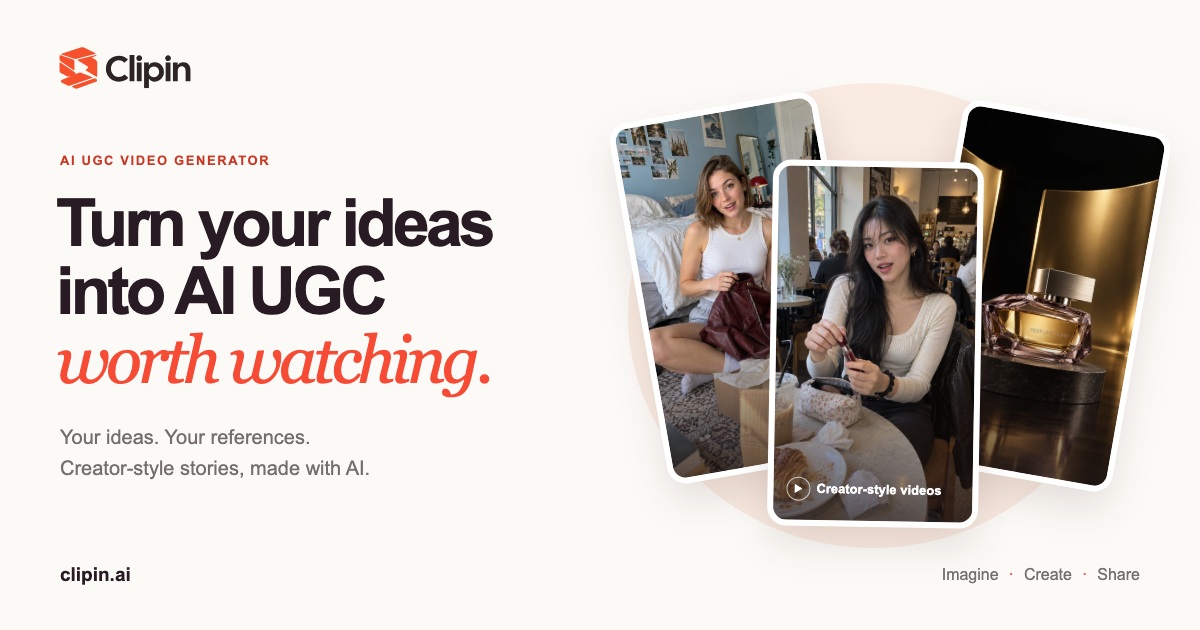
What people mean when they search “AI UGC ads”
Searchers typing ai ugc ads are rarely looking for a glossary of advertising jargon. They usually mean one practical job:
I have a product (and maybe only a still photo). I need short, vertical, creator-style clips that look like everyday UGC — so I can test creative on Meta, TikTok, YouTube Shorts, or similar — without booking a full shoot this week.
That intent sits next to two related queries that show up in the same research pass: ai ugc (the broader category of generated creator-style content) and ai ugc video generator (the tool class that turns a brief + references into a clip). This playbook is written for that job-to-be-done. It is a how-to, not a “Top X tools compared” list.
If you only need a category overview, start on clipin.ai. If you already know you want the unboxing beat specifically, the format-focused path is AI unboxing video. This page covers the ad-ready creative workflow: photo → brief → generate → review → paid-social compliance notes — plus a thicker operating layer for kill criteria, briefs by vertical, Story vs single-clip choices, and a creative test matrix that does not invent performance numbers.
What AI UGC ads are — and what they aren’t
What they are
AI UGC ads are short-form creatives made with an AI UGC video generator: text (and optional product or avatar images) → a creator-style scene where the product appears in a natural story beat. On Clipin, you can work from templates on Templates or from blank Create modes on Create (Video, Image, Story, Agent).
Duration is not one number. Template marketing pages often show a default around 15 seconds in 9:16 (and some demo captions say 10 sec). That is template default / demo length — not a hard Create maximum. In live Create (observed 2026-09-19):
- Video mode: duration is a slider labeled 4s … 30s (default observed 5s). Model copy for Seedance 2.5 says “up to 30 seconds.”
- Story mode: target duration chips from 15s Quick hook through 5m Long form, with a fine-tune slider 15s … Up to 5m (default observed 16:9 · 30s).
Prefer this phrasing in creative ops: duration varies by model and settings — confirm on /create. Short templates are common for scroll-stop tests; use Story when you need longer multi-scene narrative.
What they aren’t
Hold these lines firmly — they protect both your brand and your ads account:
- Generated ≠ real customer testimonial. AI UGC is generated content. It is not authentic buyer proof, not a real review, and not a substitute for permissioned customer footage. Do not present it as if a real customer filmed it.
- Not a guarantee of performance. This playbook does not claim ROAS, CTR lifts, or “winning ads.” Creative testing is your job; the tool’s job is readable product + usable drafts.
- Not an enterprise avatar boardroom product. Clipin’s positioning is product-first UGC: keep the SKU recognizable inside an everyday story.
- Not auto-published ads. Generation does not push to ad accounts. You review, download or share a viewing link, then place media where you control the campaign.
Template demo: Product in your hands — hands-on product story, 9:16. Generated examples · results may vary.
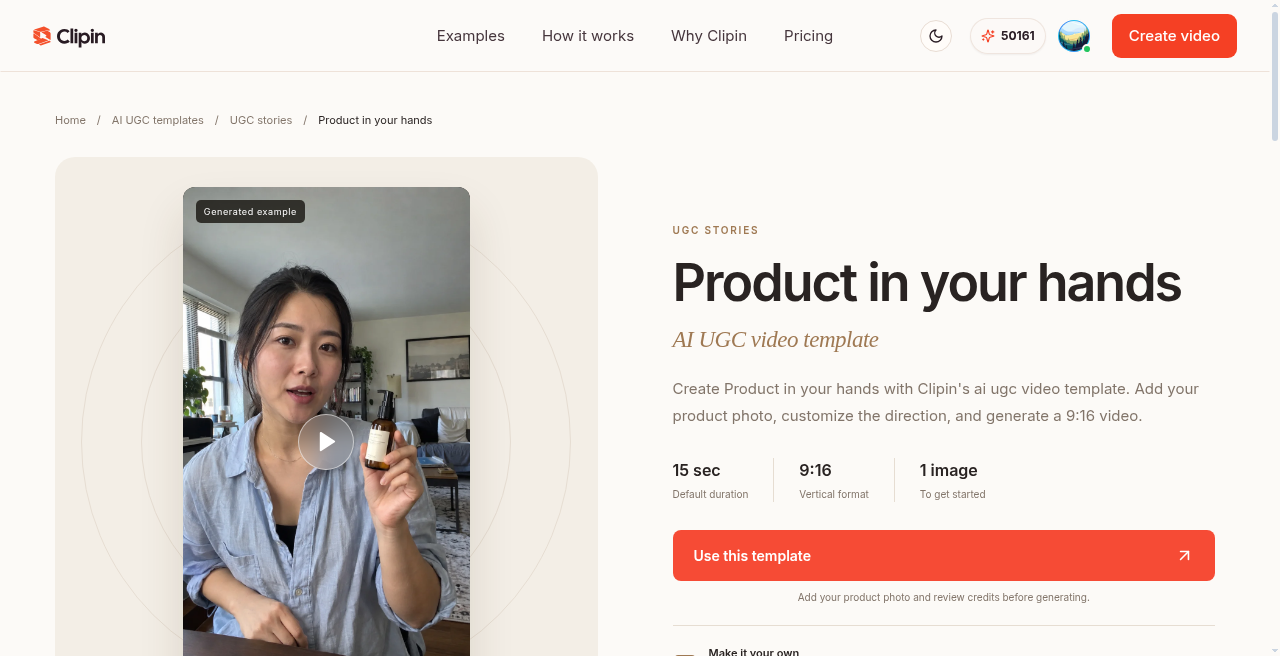
Live template card (2026-09-19): Default duration 15 sec, vertical 9:16, 1 image to get started — template default, not Create max.
Duration truth (live Create, 2026-09-19)
Operators often confuse three different numbers. Keep them separate.
1) Template marketing defaults / demos
Many template detail pages list Default duration: 15 sec and 9:16. Some generated-example captions say 10 sec. Use those as starting points for that template’s demo, not as a platform-wide ceiling.
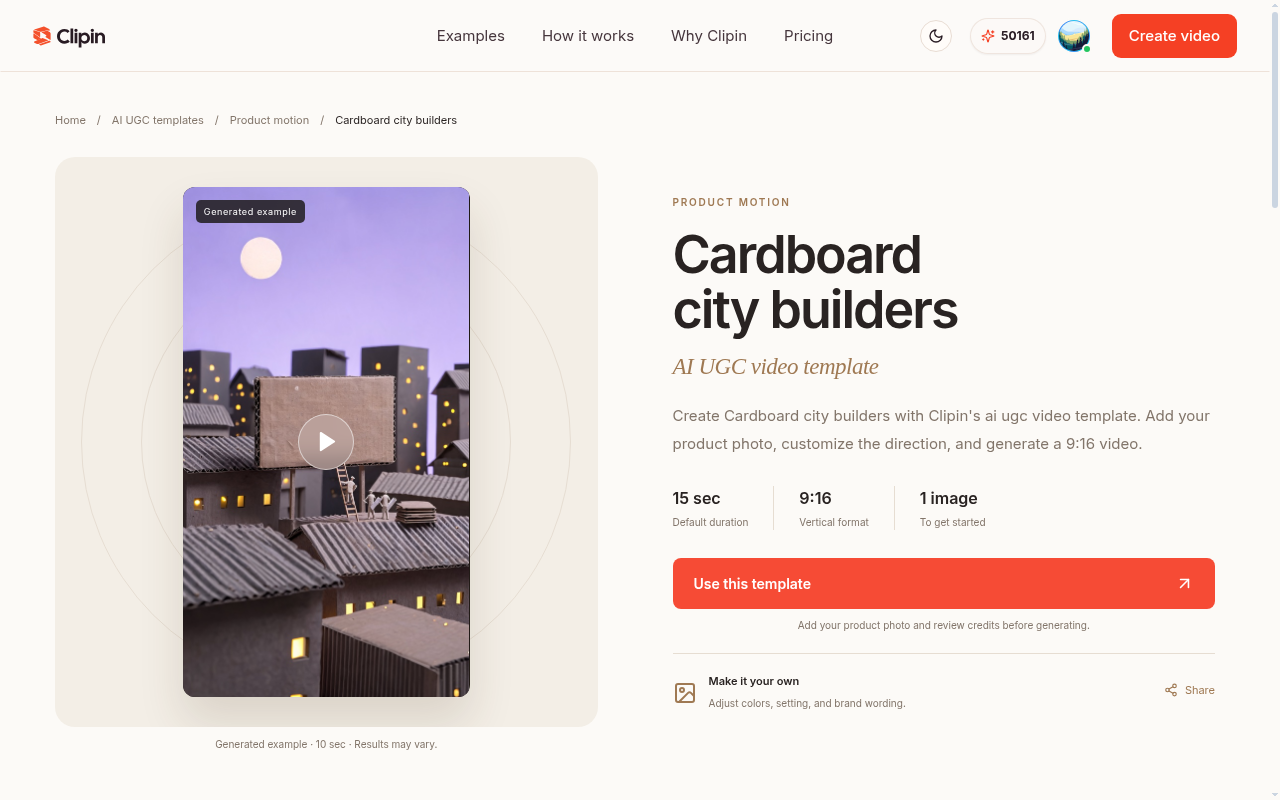
Cardboard city builders: marketing default 15 sec; demo caption may say 10 sec. Results may vary.
2) Create → Video mode
Modes available in Create: Video, Image, Story, Agent.
In Video, duration is a slider. Ends are labeled 4s and 30s. Default observed: 5s. With Seedance 2.5 selected, model description includes “up to 30 seconds.” Aspect ratio is selectable (e.g. 9:16). Credit estimates appear before generate — review them.
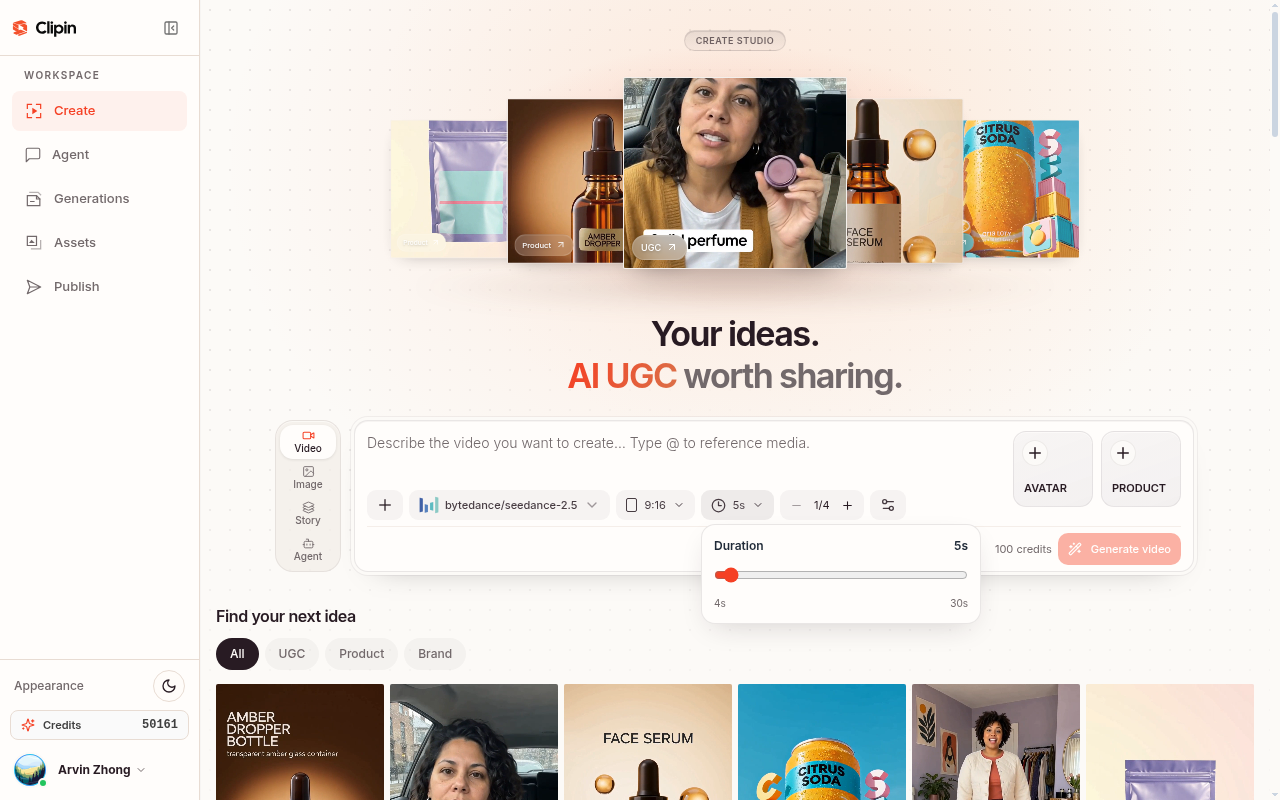
Create → Video (2026-09-19): Duration slider 4s … 30s, thumb at default 5s. Confirm live UI — settings can change.
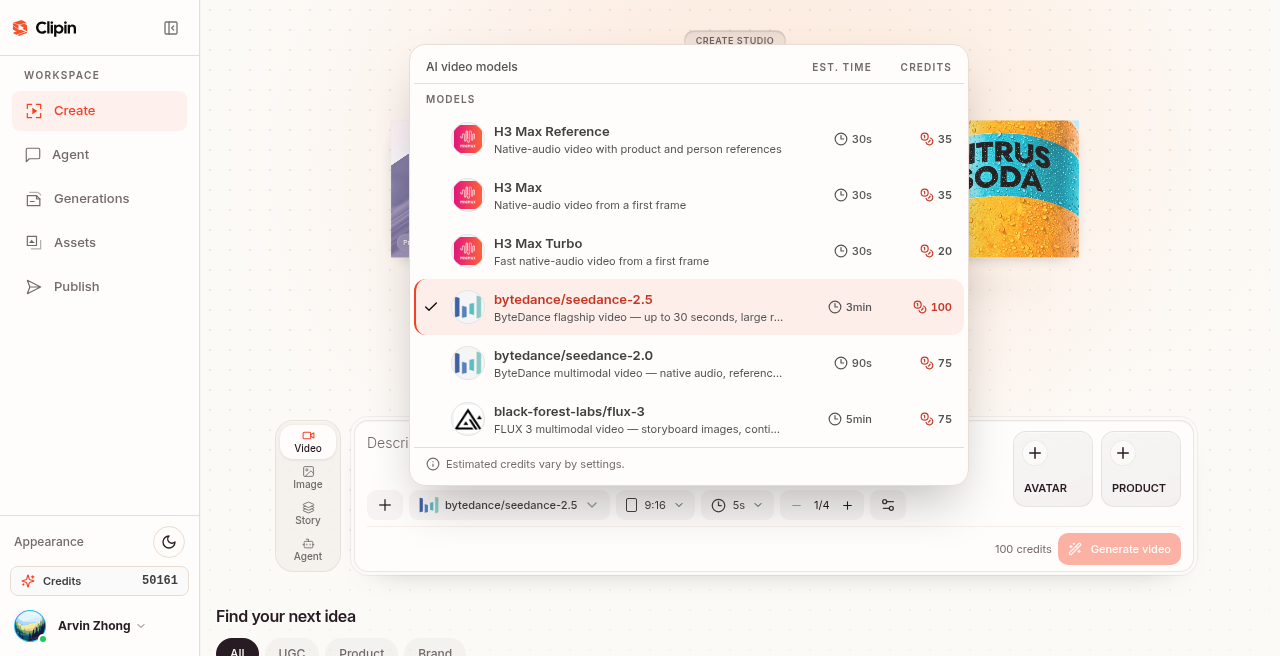
AI video models modal: Seedance 2.5 description includes up to 30 seconds. Estimated credits vary by settings.
3) Create → Story mode (longer multi-scene)
Story is the path for longer multi-scene narrative. Target duration chips observed:
| Chip | Label |
|---|---|
| 15s | Quick hook |
| 30s | Standard short |
| 1m | Deep dive |
| 1.5m | Explainer |
| 3m | Mini documentary |
| 5m | Long form |
Fine-tune slider ends: 15s … Up to 5m. Default observed: 16:9 · 30s. Story credit estimates are typically higher than a short single Video clip — treat Story as a deliberate spend, not a casual rerun.
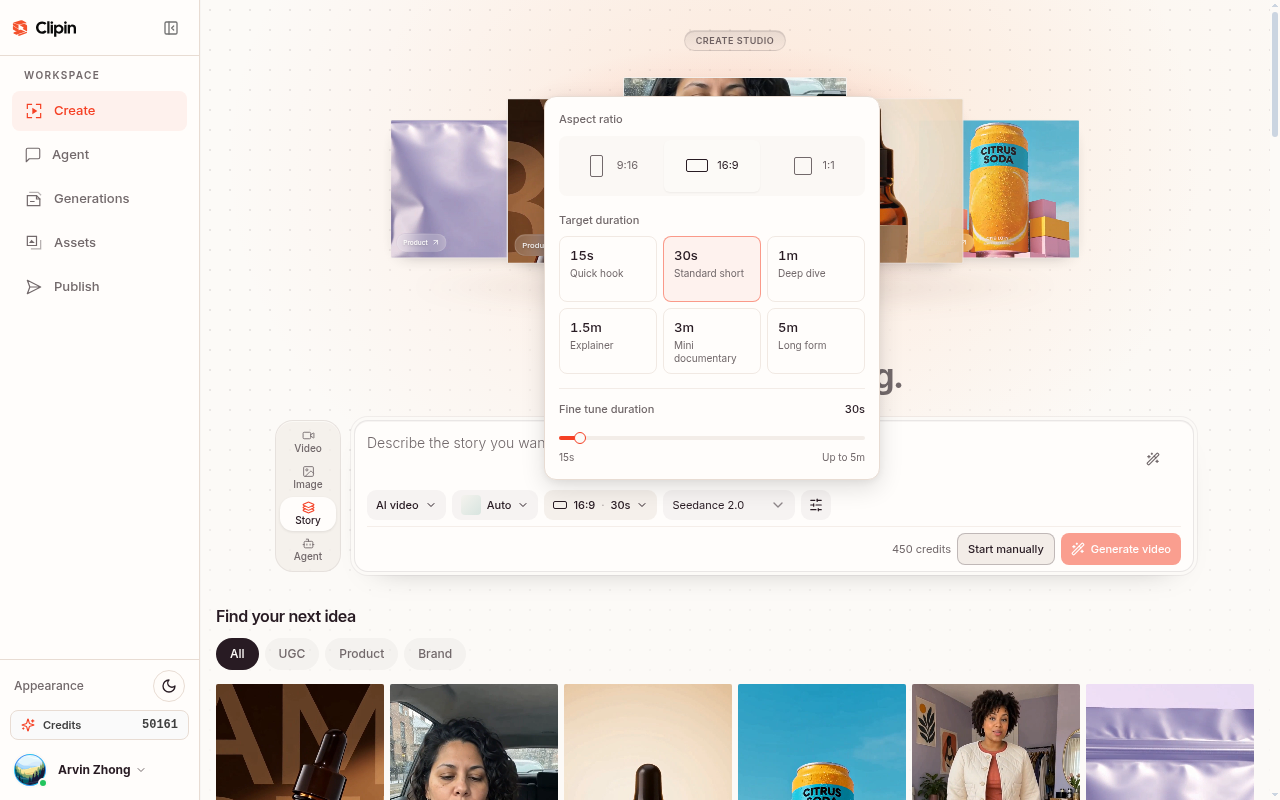
Create → Story (2026-09-19): chips 15s–5m, fine-tune 15s … Up to 5m, default 16:9 · 30s.
Never invent a global max beyond what was visible. Prefer: duration varies by model and settings; confirm on /create.
The playbook: product photo → brief → generate → review → paid social
Treat this as a repeatable operating procedure. Timebox the first usable draft to 20–40 minutes, including at least one deliberate reject. Longer Story drafts take more review time — budget for scene-level QA.
Step 1 — Start with one honest product photo
Your reference image does more work than a long prompt. Prefer:
- Front three-quarter or straight-on pack shot
- Even light; label / logo readable at phone width
- Clean background (busy lifestyle stills fight the model for attention)
- Correct colorway and SKU you actually sell
Avoid: tiny product in frame, heavy filters, multipacks with unreadable secondary SKUs, or screenshots of someone else’s listing.
Kill criteria before you generate: if you wouldn’t trust this still on a PDP thumbnail, don’t spend credits on it yet. Crop tighter or re-shoot on a phone — five minutes of photo hygiene beats three wasted generations.
Step 2 — Write a brief, not a script
Operators who paste a 200-word monologue get muddy motion. Use a two-line brief plus one constraint line:
- Line 1 — action: what happens to the product (place, open, spray, put on, tap).
- Line 2 — place + tone: bathroom shelf / desk / doorway; casual, quiet, no hard sell.
- Constraint: aspect ratio (often 9:16 for feed ads), duration setting you intend to use in Create, keep logo readable, no invented claims about results.
Match the brief to a template direction when one exists. Browse the gallery on templates instead of inventing a format from a blank page. For longer Hook → Demo → Lifestyle → CTA arcs, prefer Story and write scene beats, not one endless paragraph.
Step 3 — Generate with an AI UGC video generator (Clipin path)
- Open Create or start from a template page.
- Choose mode: Video (single-clip), Image, Story (multi-scene), or Agent.
- Add your product photo (and optional avatar photo if the template asks).
- Paste your brief; adjust color, setting, or wording only where needed.
- Choose format / model / duration settings available in the UI — check the live slider or chips; do not assume “always 10–15s.”
- Review the credit estimate before you submit. Anonymous visitors can explore prompts; generating requires sign-in.
- Wait for the result under your creations / projects — Clipin does not auto-publish.
Useful product-first starting points:
| Job | Template | Notes |
|---|---|---|
| Hands-on intro | Product in your hands | Marketing default often 15s · 9:16; needs a clear product photo |
| Unboxing / detail | A little unboxing / detail unboxing | Reveal beat; package → product |
| Surreal product motion | Cardboard city builders | Product-in-world motion; great for scroll-stop tests; demo may show ~10s |
| Morph / reveal motion | Droplet-to-product reveal | Product motion; pair with a clean hero still |
Demo clip from Cardboard city builders — product-scale worldbuilding for scroll-stop creative tests. Generated examples · results may vary.
Demo clip from Droplet-to-product reveal — liquid morph into a readable product beat. Generated examples · results may vary.
Step 4 — Review like an ad buyer, not like a film critic
Reject on SKU truth first. Approve only if:
- Logo / label is readable at phone width
- Colorway matches the SKU you sell
- No extra fingers, melted packaging, or “generic bottle” substitutions
- The story beat matches the brief (intro vs unbox vs in-use)
- Audio / voiceover (if used) does not invent claims you cannot substantiate
Change one variable per rerun: crop, brief wording, or template. Do not rewrite the whole brand between attempts. For fail patterns in more detail, use the kill criteria section below.
Demo clip: ugc-detail-unboxing — package open → product detail. Generated examples · results may vary.
Step 5 — Paid-social notes (compliance hygiene only — not legal advice)
When you move a generated clip into paid social, treat compliance as part of creative QA. The checklist later in this playbook is an internal pre-flight, not legal advice. Policies and disclosure rules differ by platform and region — confirm with your counsel / platform docs before spend.
This section intentionally avoids ROAS, “winning ad,” or case-study language. Those belong to your own experiments with clean measurement — not to a how-to draft.
Kill criteria and fail cases (expand before you burn credits)
Treat rejection as a feature of the workflow, not a failure of the operator. Most wasted spend comes from approving “almost good” frames that break SKU trust on a phone screen.
A) SKU distortion
What it looks like: bottle becomes a different silhouette; pump turns into a dropper; box proportions stretch; secondary SKUs on a multipack melt into illegible blobs; “close enough” packaging that would never pass a brand QA review.
Why it hurts ads: viewers may still watch, but your landing page shows a different object. That mismatch is a trust break and a common reason creative gets pulled in review or underperforms after the first click.
Operator response:
- Re-crop the reference so the product fills more of the frame (logo-forward).
- Shorten the brief to one clear action — remove poetic adjectives that invite the model to invent packaging.
- Swap to a simpler template beat (hands-on hold vs complex morph).
- Reject the cut even if the lighting is pretty. Pretty + wrong SKU = fail.
Hard kill: label text is unreadable at phone width, or the product could be confused with a competitor’s pack.
B) Hand / body collapse
What it looks like: extra fingers, fused knuckles, hands that pass through the bottle, arms that detach at the wrist, product floating without grip contact, avatar face morphing mid-turn.
Why it hurts ads: uncanny hands are a fast scroll-past and a brand-safety smell for paid social. Even if you personally “get” AI, many buyers do not.
Operator response:
- Prefer beats where the product rests on a surface (shelf, desk, counter) rather than complex two-handed manipulation.
- If the template is “product in hands,” demand a still where both product and hand contact are already clear in the reference.
- Cut duration shorter in Video mode (e.g. nearer the default short end of the slider) so there is less time for hand motion to degrade.
- Move the story weight to product motion templates when talent hands keep failing.
Hard kill: any frame you would not show a brand manager without apology.
C) Color shift and lighting lies
What it looks like: amber glass becomes clear; matte black becomes glossy navy; pastel label washes to white; “golden hour” that invents a different Pantone than your PDP; metallic finishes that flare into chrome the SKU does not have.
Why it hurts ads: color is identity for many CPG and beauty SKUs. A shifted colorway trains the wrong mental model before the click.
Operator response:
- State the color explicitly in the brief (“keep the amber glass and white label; do not shift to clear”).
- Use a neutrally lit reference; avoid heavily filtered Instagram exports as the only input.
- Compare the output side-by-side with the PDP hero on the same phone.
- Reject “moodier” cuts that look cinematic but sell the wrong color.
Hard kill: colorway would fail a brand brand-book check against the live PDP.
D) Claim and audio drift
What it looks like: voiceover or on-screen text invents “clinically proven,” “cures,” “guaranteed,” “#1,” or competitor digs you never wrote.
Operator response: strip claims in the brief; regenerate; never “fix in post” by hoping the platform reviewer misses it. Align every spoken or written claim with what the landing page can substantiate.
E) Story-level continuity fails (Story mode)
What it looks like: product appearance changes between scenes; avatar wardrobe resets; setting jumps without a purposeful cut; CTA scene shows a different size or color than the hook.
Operator response: write scene cards with the same SKU description repeated; review scene-by-scene before approving the whole Story; lower ambition (fewer scenes) before adding polish.
Quick reject rubric (print this)
| Check | Pass | Fail → action |
|---|---|---|
| Logo readable at phone width | Yes | Re-crop reference / simpler beat |
| Colorway matches PDP | Yes | Explicit color constraint / new still |
| Hands / body not collapsed | Yes | Surface placement / shorter clip / different template |
| Packaging silhouette correct | Yes | Kill; do not “hope the next frame fixes it” |
| No invented claims in VO/text | Yes | Strip brief; regenerate |
| Beat matches brief (intro/unbox/use) | Yes | One-variable rerun |
| Landing product = ad product | Yes | Stop — fix creative or LP first |
Copyable brief library (by vertical)
Use these as starting paste blocks. Replace bracketed fields. Keep the constraint line. Do not add medical, income, or performance guarantees.
1) Beauty / skincare (serum, cream, dropper)
Reference: the attached product photo of the [amber dropper bottle / white jar]; keep the [white label text / dropper shape / pump silhouette] accurate.
Scene: sunlit bathroom shelf, soft morning light, slight clutter OK.
Action: set the product down, [unscrew once / one slow dropper lift / one pump], return to shelf.
Tone: calm, conversational, not a hard sell. 9:16. Duration: set in Create (short Video clip or Story hook — confirm on /create). No medical claims. Keep logo readable.
Variant — routine beat: “Apply one pump to back of hand, show texture briefly, place bottle back — no before/after skin claims.”
2) Gadgets / consumer electronics (earbuds, headphones, charger)
Reference: [black over-ear headphones / compact earbuds case]; keep [silver hinge / ear-cup logo / case latch] recognizable.
Scene: real desk, laptop half-closed, afternoon window.
Action: pick up, [put on / open case / plug in once], slight smile to camera.
Tone: quiet everyday. 9:16. Keep product colors accurate. No invented battery-life or “best ever” claims.
Variant — unbox: “Open retail sleeve, lift product once, hold logo to camera — no competitor comparisons.”
3) F&B / supplement (can, pouch, bottle)
Reference: [citrus soda can / supplement pouch / protein tub]; keep [logo lockup / flavor color / scoop if visible] accurate.
Scene: kitchen counter, natural daylight, clean but lived-in.
Action: [crack can / tear pouch / scoop once into shaker], set down facing camera.
Tone: casual, no hype voice. 9:16. No health outcome claims; no “burns fat” or disease language. Color must match the flavor SKU on the LP.
Variant — pour beat: keep liquid color consistent with packaging; reject if liquid invents a different flavor story.
4) Apparel / accessories (jacket, bag, sneakers)
Reference: [navy nylon jacket / leather tote / white sneakers]; keep [silhouette, zipper color, logo patch] accurate.
Scene: apartment doorway or soft indoor light near a window.
Action: [put on jacket / lift bag to shoulder / step into frame showing shoes], hold for a clear logo beat.
Tone: lifestyle, not runway. 9:16. No size/fit medical claims. Fabric color must match the PDP swatch.
Variant — detail: “Close-up of zipper / sole / stitching — then pull back to full product. Reject if logo patch morphs.”
5) Home / home goods (candle, cleaner, small appliance)
Reference: [matte candle jar / spray cleaner / compact blender]; keep [label, cap color, button layout] readable.
Scene: kitchen or living-room shelf, soft daylight.
Action: [lift lid / spray once away from camera / place on counter], show the label clearly.
Tone: calm home. 9:16. No “kills 99.9%” or unsubstantiated efficacy claims unless your LP and compliance team already own that language. Keep brand color accurate.
Shared closing line for all verticals: “Generated AI UGC creative — not a real customer testimonial. Review before paid placement.”
When to use Story vs single-clip UGC
| Need | Prefer | Why |
|---|---|---|
| Scroll-stop test, many angles this week | Video single-clip or short template | Faster iteration; lower credit risk per attempt; easy A/B of hooks |
| One clear product beat (hands, unbox, desk) | Template → Video | Direction is already shaped; you supply SKU + brief |
| Hook → demo → lifestyle → CTA arc | Story | Multi-scene narrative; duration chips up to long-form (confirm live) |
| Explainer / mini documentary pacing | Story (1.5m–5m chips if available) | Single 5–15s clip cannot carry multi-beat education |
| Budget-sensitive exploration | Short Video near default short duration | Story estimates are often higher — review credits before submit |
| Paid feed placement that must stay punchy | Short Video or Story 15s Quick hook / 30s Standard short | Longer Story may suit landing/organic more than a cold feed thumb-stop |
Rule of thumb: if you cannot describe more than one meaningful beat, stay in single-clip Video. If you need continuity across beats and a deliberate arc, use Story — and write scene cards.
Do not treat template “15 sec default” as proof that Story cannot go longer, or that Video cannot be set elsewhere on the slider. Confirm on /create.
When to use Agent (chat + artifacts) vs Create forms
Clipin offers two ways to create AI UGC ads: single-form Create modes (Video, Image, Story) and Agent, a multi-turn chat interface with persistent artifacts.
Create forms
The direct path when you know what you want:
- Pick Video, Image, or Story mode
- Fill one form with SKU, brief, and settings
- Submit and download
- One job per submission
Agent
A conversational workspace for multi-step creative work:
- Multi-turn planning: iterate on briefs and references before generating
- Artifact panel: each successful step (brief, image set, video, story, render) stays visible on the right
- Thread memory: reference prior outputs with @ style — "Make another version like @video-3 but shorter"
- Idea to Story pipeline: go from concept → written brief → product images → faceless video → multi-scene Story in one thread
| Need | Use |
|---|---|
| Known brief + quick turnaround | Create form (Video/Image/Story) |
| Exploring angles / iterating briefs before generation | Agent |
| Multiple related outputs from one creative direction | Agent |
| Already have template + SKU | Create or Templates |
Free plan includes chat and brief artifacts; generation tools (images, videos, stories) require paid plan + credits with spend confirmation for larger jobs. Agent does not replace templates or forms — it is another path for multi-step, conversational UGC ads work when planning and iteration matter.
Try it in Agent. Sign in required to create threads or generate.
Creative test matrix (swap one variable — no fake ROAS)
The goal of a matrix is learning, not a dashboard screenshot for a blog. Do not invent CTR, ROAS, or “winner” percentages here. Run small, labeled batches and judge with your ads account metrics.
Axes to swap (one at a time)
- Template / format — e.g. Product in your hands vs detail unboxing vs cardboard city motion.
- Brief — action line only; keep the same reference image.
- Reference image — same brief; tighter crop vs wider pack shot vs alternate colorway (only if that colorway is live on the LP).
- Mode / duration setting — short Video clip vs Story 30s Standard short (confirm live controls).
- Model (when UI offers several) — only if you understand credit estimates; cheaper models for exploration, flagship when SKU fidelity matters.
Example 2×2 for a single SKU (label your folders this way)
| Brief A — “set down + one action” | Brief B — “talk-to-camera hold” | |
|---|---|---|
| Template 1 — hands-on | A1 | B1 |
| Template 2 — unbox | A2 | B2 |
Ship only cells that pass the kill rubric. In ads manager, keep naming parallel (sku_hands_A1, etc.) so creative learning is attributable. No performance numbers belong in this article — measure in your account.
Guardrails for fair tests
- Same landing URL and offer across the matrix cell you are comparing.
- Same disclosure posture for generated media.
- Do not “fix” a failed SKU cut by pouring more budget into it.
- Cap reruns: if three attempts fail the same kill criterion, change the reference photo before changing the bid strategy.
Pre-flight paid-social compliance checklist
Not legal advice. Platform policies, advertising standards, and regional disclosure rules change. Use this as an internal creative ops checklist; have qualified counsel review your claims and disclosures for your markets.
Disclosure and representation
- Creative is clearly generated AI UGC, not framed as a real customer filming their own review.
- Any required AI / synthetic media disclosures for the target platform / region are planned (placement: caption, in-ad text, or account-level — follow current platform rules).
- Talent / avatar is not presented as a specific real customer or employee without rights.
- No fake “verified buyer” badges or invented review stars baked into the edit.
Claims and substantiation
- No disease, cure, guaranteed outcome, or income claims unless your compliance process already cleared identical language for the LP.
- Superlatives (“#1,” “best,” “clinically proven”) removed or matched to approved substantiation.
- Competitor naming / disparagement removed unless legal has approved comparative advertising.
- Voiceover matches on-screen text; no “accidental” claim drift from generation.
Landing page consistency
- Product in the ad = product on the destination (SKU, colorway, size story).
- Offer (price, bundle, trial language) matches the LP — Clipin has no free trial; do not invent one in ad copy for Clipin itself, and do not invent offers for your brand.
- Before/after or results imagery (if any) follows your brand’s evidence standard — when in doubt, cut it from AI UGC cuts.
Asset and ops hygiene
- Final file is the review-approved export (not an older reject).
- Internal record kept: date, template or mode, brief, reference filename, model/settings if noted, disclosure decision.
- Generation did not auto-publish — you (or your ads tool) place the media.
- Comments / community reply guidelines exist if the ad will attract “is this AI?” questions — answer honestly.
Platform placement notes (high level)
- Confirm vertical safe margins for UI chrome on each network.
- Confirm audio rules (some placements start muted — put the SKU readable in the first frames).
- Confirm any industry-specific restricted categories (supplements, alcohol, finance, etc.) with platform policies before scaling spend.
When to use Clipin (product-first UGC)
Choose Clipin when the bottleneck is creative supply for product stories, not enterprise avatar pipelines or URL→50-variant factories.
Good fit
- You already have pack shots or simple product photos
- You need creator-style AI UGC for short-form and early paid tests
- You want templates for unboxing, hands-on, lifestyle, and product motion
- You need longer multi-scene arcs via Story
- You prefer a shared credit pool across video, images, and voiceovers
Weaker fit
- You need authenticated customer interviews as legal proof
- You only need a SaaS screen recording of a web app
- You expect a free trial (Clipin has no free trial)
Pricing (match live SoT on pricing)
- Starter: $29 / month, or about $24.17 / month when billed yearly ($290 / year)
- Studio: see clipin.ai/pricing for current Studio rates and allowances
- Experience Pack: $4.99 one-time · 115 credits · valid 30 days — a paid way to try, not a free trial
Credits are shared across images, videos, and voiceovers. Review the estimate in Create before you submit. Monthly plan credits don’t roll over (stated on site). Always re-check live pricing before purchase — numbers can change.
Light principles vs other approaches
One short contrast — enough to choose a path, not a competitor tour:
| Approach | Strength | Watch-out |
|---|---|---|
| Product-first AI UGC (Clipin’s lane) | Fast drafts from your still + brief; SKU stays the hero | Generated ≠ real testimonial; review every frame |
| Traditional creator shoot | Authentic talent and real lighting | Cost, scheduling, hard to spin many directions weekly |
| Stock / generic templates only | Cheap motion | Weak product recognition; often fails paid review for mismatch |
| Talking-head avatar stacks | Presenter-led explainers | Easy to drift away from the physical SKU you sell |
Stay in the lane that matches the asset you have. If you only have a product photo and need a creator-style beat this week, product-first UGC is the honest fit. No “go use competitor X” CTA belongs here — open Create or Templates when you want to try Clipin’s path.
FAQ
1) What are AI UGC ads?
AI UGC ads are paid or organic short-form creatives made with generated creator-style video (and sometimes images). They resemble everyday UGC in tone and framing, but they are generated — not real customer testimonials.
2) Is AI UGC the same as a real customer review?
No. AI UGC ≠ real customer testimonial. Use it as creative storytelling around your product. Use real, permissioned customer content when you need authentic social proof.
3) What is an AI UGC video generator?
An AI UGC video generator turns a text brief and optional reference images into a creator-style clip. Clipin’s generator supports product demos, unboxings, explainers, and everyday stories, plus templates and multi-scene Story mode. Start at Clipin or Create.
4) Can I use my own product photos?
Yes. Add a clear product photo where the template or create form requests references. Support for file types and limits depends on the selected model — check the form before submit.
5) How much does it cost? Is there a free trial?
There is no free trial. Starter is $29 monthly or about $24.17 monthly when billed yearly. Studio details live on pricing. For a small paid start, the Experience Pack is $4.99 (115 credits, 30 days). Always confirm live numbers on the pricing page before purchase.
6) Will my ad look exactly like the template preview?
No. Previews and demos illustrate creative direction. Your images, brief, model, and settings change the result. Treat every output as a draft until you pass the SKU review checklist above.
7) How long can Clipin videos be?
It depends on mode and settings — confirm on /create. Observed 2026-09-19: Video duration slider 4s–30s (default ~5s); Seedance 2.5 model copy says up to 30 seconds. Story offers target chips from 15s through 5m, with fine-tune 15s … Up to 5m (default observed 16:9 · 30s). Template pages often list 15 sec defaults (and some demos say 10 sec) — those are template defaults/demos, not a global Create max. Do not invent a ceiling beyond what the live UI shows.
8) When should I use Story instead of a single Video clip?
Use Story when you need multi-scene narrative (hook → demo → lifestyle → CTA) or longer explainer pacing. Use single-clip Video or short templates when you need fast scroll-stop tests and many directions per week. Review credit estimates — Story is often a larger spend per generate.
9) What should I reject immediately in QA?
Reject for SKU distortion, hand/body collapse, color shift vs the PDP, invented claims in VO/text, or any cut you would not show a brand manager. See the kill criteria section. Pretty lighting does not save a wrong product.
10) How do I test creatives without chasing vanity metrics?
Run a small matrix: swap one of template, brief, or reference per cell; keep LP and offer constant; name ads consistently; judge inside your own ads account. This playbook does not publish ROAS or CTR benchmarks — those would be fake in a draft without your data.
11) Do I need to disclose that the ad is AI-generated?
Follow each platform’s and your region’s current rules for AI / synthetic media and advertising disclosures. Separately from platform rules: do not imply a real customer made the video. This FAQ is not legal advice — confirm with qualified counsel for your markets.
12) Does Clipin auto-publish to my ad accounts?
No. Generation creates a draft for you to review. You download or otherwise export/share as the product allows, then place media in the ads tools you control. Do not assume campaign creation, audience building, or bidding happens inside generation.
13) What is Clipin Agent?
Agent is a conversational workspace for multi-step AI UGC ads work. Instead of filling one form at a time, you chat with tools and build persistent artifacts (briefs, image sets, videos, stories) visible in the right panel. Reference prior outputs with @ style to iterate. Free plan includes chat + briefs; generation tools require paid plan + credits. Different from single-form Create modes when planning and iteration matter. Try it in Agent.
Next step — make the next clip yours
You now have a full loop: honest photo → tight brief → generate → SKU review → compliance-aware paid placement — plus kill criteria, vertical briefs, Story vs clip guidance, and a test matrix that stays honest about measurement.
Keep the primary promise small and true: readable product inside an AI UGC story, with duration set deliberately in Create, ready for you to test.
- Start a draft in Create
- Explore multi-step creative work in Agent
- Steal a format from Templates
- Check credits and plans on Pricing
Remember: AI UGC is generated content, not a real customer testimonial. Review before you spend. No free trial — Experience Pack $4.99 if you want a small paid start. Duration varies by model and settings — confirm on /create.